
When comparing microcontrollers vs microprocessors, most articles focus on the "nitty gritty" technical specs instead of the big picture. This article takes a different approach—we'll zoom out and look at not just the differences between MCUs and MPUs, but more importantly, when you'd actually choose one over the other in a real design.
The video above is from my Live Lecture Series where I dive deeper into this topic. The article below summarizes the key points with some additional detail.
PDF version of the slide deck from the livestream: Microcontrollers vs Microprocessors – Live Lecture Series #1
What is the Difference Between a Microcontroller and Microprocessor?
A microcontroller (MCU) is a self-contained chip with a processor, memory, and peripherals built-in, designed for dedicated control tasks. A microprocessor (MPU) is just the processor itself, requiring external RAM, storage, and peripherals, but offering more computing power for complex applications like running Linux.
What Does Google Say?
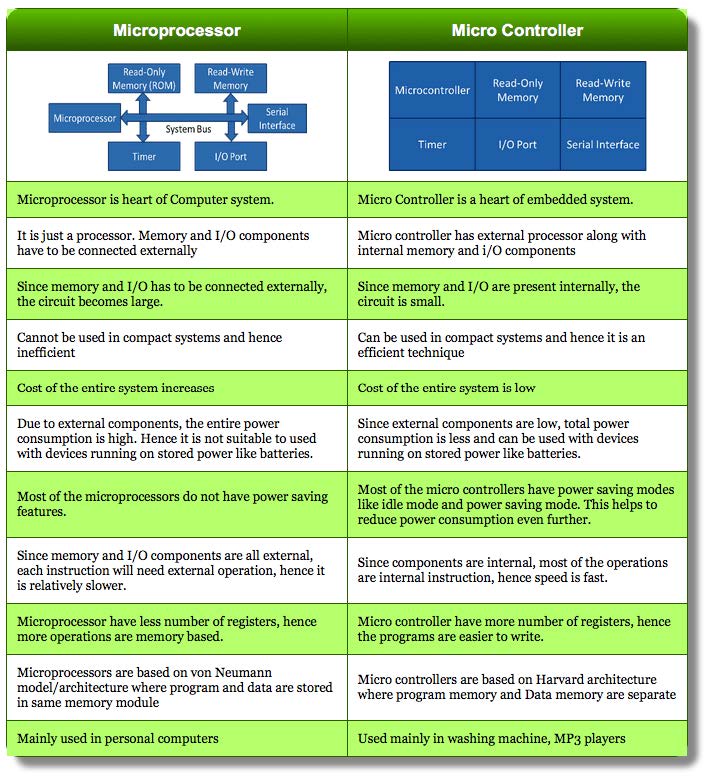
If you search Google to find the differences, you will be inundated with articles and charts like the one above. While these statements are mostly true, it really doesn’t tell the whole story. I will not recite what is in the chart, instead I encourage you to read through it yourself.
I would like to point out a few statements though: “Cannot be used in compact systems and hence inefficient”, “Most of the microprocessors do not have power saving features“, and “Mainly used in personal computers”. At best these are highly oversimplified statements. At worst, they are simply not true. Like everything in electronics design, there are always exceptions and distinctions depending on the application.
MCU vs MPU: Definitions and Common Examples
Unfortunately, there are a lot of different terms and wording in this space to describe essentially the same thing. For the sake of this article (and how I talk about these in general) I will use the following:
MCU: Microcontroller – Processor + Storage + Peripheral’s* + Power Management.
MPU: Microprocessor – Simply the Processor.
SBC: Single Board Computer – Everything needed to run a desktop OS on a single board.
*Some peripherals will still require external PHY’s/hardware (ethernet)
Some common examples of Microcontrollers and Microprocessors:
MCU’s:
- Microchip ATMEGA328 (Arduino).
- STMicro STM32.
- Espressif ESP32.
MPU’s:
- BCM28xx/BCM2711 (Raspberry Pi).
- AM335x (Beagle Bone).
- Jetson Nano (Tegra K1).
- Computer CPU’s.
Commonly discussed advantages of an MPU are that they have more processing power and more memory. While an MCU is cheaper and easier to develop for. While these are true for the most part, they don’t tell the whole story when comparing a microprocessor vs a microcontroller.
Real World Example
To give a more concrete example of how to compare a microprocessor vs a microcontroller I will give a real-world example that we encountered on a job we did a proposal for.
It was an audio mixer that took in several audio channels. It would mix and apply filters to the streams, then output a single stream of audio.
We came up with two very different solutions:
MCU based approach: Uses a mixture of analog components and digital IC’s. The MCU controls the analog blocks and the IC’s.
MPU based approach: All audio is directly fed into the MPU, which handles all mixing and filtering. The audio stream is then output from the MPU.
While both of these approaches would work, there are some pretty massive differences between them.
Microprocessor Solution
- Incredibly flexible.
- Less external audio hardware.
- Due to the above, it could end up being cheaper.
- Easy to implement software using existing libraries.
Microcontroller Solution
- Limited flexibility.
- Requires a lot of analog and digital hardware.
- Real-time audio, minimal latency.
Our Answer
While we ended up not actually working on this design, the solution we proposed was based around a Microcontroller. One of the client’s main criteria was that the audio needed to be passed through with minimal latency. That alone made the MPU solution tough to pull off.
Another common decision point is for motor control. When designing an H-bridge circuit, real-time PWM timing often favors an MCU approach.
Microprocessor vs Microcontroller Operating Systems
One of the key differences between a microprocessor and a microcontroller is the existence of an operating system. A microcontroller tends to run bare metal code or uses a Real Time Operating System (RTOS). A microprocessor will normally run a true operating system, typically some flavor of Linux.
Having Linux on an embedded system allows you to easily do in software what would be nearly impossible using a bare-metal approach.
Note: MCU’s can technically run a true operating system, but it is not commonly done, and I will not discuss that use case.
Why is Designing with Microprocessors Difficult?
Nearly every comparison chart discussing a Microcontroller vs a microprocessor mentions that designing with a MPU is more difficult. On the hardware side it is hard to disagree with that.
First, the majority of MPU’s use BGA packages. Often, quite fine pitch, high pin count BGA’s! An experienced electronics design shop certainly won’t have any issues with this, but it is something to keep in mind.
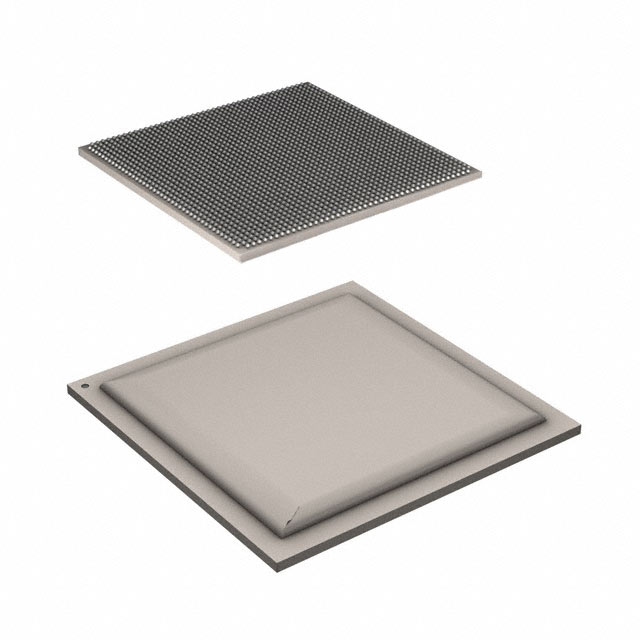
Also, MPU’s require external flash and RAM (some will have a bit of onboard flash, but you will still need additional for most applications.) While having more RAM/Flash is one of the common reasons to use a MPU in the first place, it increases hardware complexity. DDRx memory is also a high-speed interface that requires higher layer count PCB's and controlled impedances. Properly reading IC datasheets becomes critical when selecting MPUs and their supporting components.
Finally, getting Linux up and running can be an awful experience. It is nearly 100% dependent on vendor support. Common Linux distributions are Ubuntu/Debian, Yocto, and BuildRoot.
Dealing with Real-Time Requirements
Often, the single differentiating factor when deciding between a microcontroller and a microprocessor is the real-time response. Due to the operating system, MPU’s are inherently not real-time systems. For some applications this is not an issue, for others this is a complete deal breaker.
If you need real-time response and also to run Linux, there are a few solutions:
First, you can have an MPU as the controller for the system. It will then talk to an external MCU over SPI/UART/i2c/etc. The MCU would handle the time critical functions, while the MPU handles everything else. This is a very commonly used solution in industry.
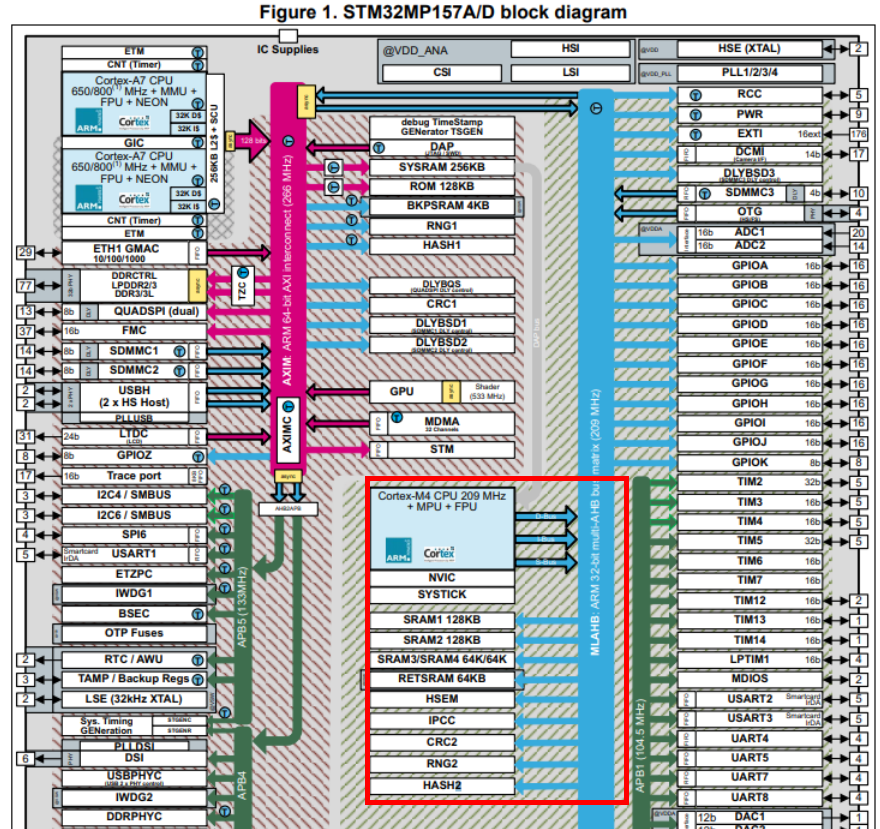
Second, some more modern microprocessors are embedding a secondary co-processor onboard. The STM32MP1 is an example of an MPU that has one. This co-processor can be used to offload code that needs to be able to run real-time.
How Do I Choose?
To boil down this topic even further, I will discuss how we evaluate a new design. Normally, the default option is to just use a microcontroller. The majority of applications that we encounter, it makes the most sense.
If the project is:
- Computationally heavy
- Computer vision.
- Machine learning.
- Anything with a lot of math calculations.
- Onboard graphics engine.
- Complex motion control algorithms.
- Memory intensive
- Driving displays or human-machine interfaces.
- Large LED arrays.
- Requiring specific interfaces
- High-speed USB.
- HDMI.
- Ethernet.
Then we will consider using a microprocessor instead of a microcontroller.
From there, if we think the application requires a true operating system to give the best solution, we will lean towards using a microprocessor. If there is an interface that must be real-time, then we normally will add additional microcontrollers to the design to handle that aspect.
Conclusion
There are a lot of articles out there discussing microcontrollers vs microprocessors. Instead of taking an approach of just compare/contrasting pros/cons I used more concrete, real-world examples. While there are certainly applications that require a microcontroller or a microprocessor specifically, normally both will work. It is a matter of deciding which approach makes more sense both in BOM cost and design time.
MicroType Engineering specializes in custom electronics design, from microcontroller and microprocessor based systems to complete product development. Whether you're choosing between an MCU and MPU for your next project or need firmware support for an existing design, reach out to learn how MTE can kickstart your new design today!


.webp)

