How to Panelize PCBs within KiCad

Learn to panelize PCBs entirely in KiCad with key footprints and techniques for optimal fabrication and minimal warpage in assembly.
By
Kyle Hunter
-
August 3, 2025

Panelizing PCBs from withing KiCad

I’ve posted two YouTube videos (Video 1 & Video 2) going over how we panelize PCBs entirely with KiCad. In doing so, we use several footprints I created. The most important two are the SINGLED_SIDED_TAB and the DOUBLE_SIDED_TAB. These footprints use the Cmts.User layer to show the fab house where a 2mm router should be used. The panel below was DFM’d and rendered using the gerber tool Fab3000
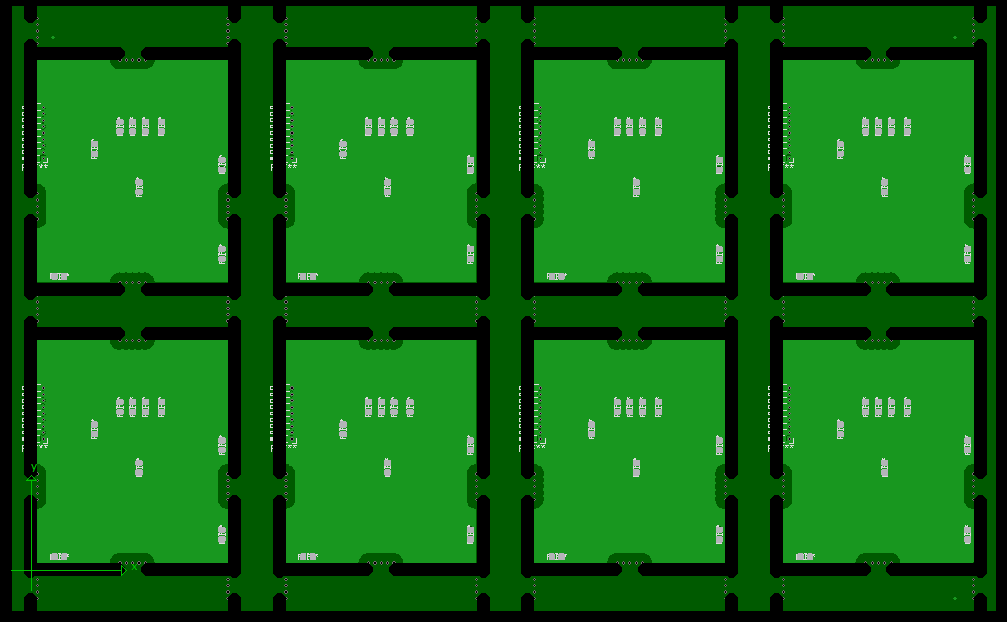
Example of PCB panel created within KiCad
Render of a mouse bite tab created within KiCad using our library. Notice the large supports going North and South. This ensures that your assembly house will not have to battle panel warpage while assembling.

The biggest drawback of using KiCad like this is that there is no way to directly update the panel when the PCB version updates. Our method focuses on making the initial panel as simple/fast as possible. When needing to update the board, it is quick enough to just recreate the entire panel directly. One item to note that I don’t fully mention in the video is in regards to the Cmts.User. You must ensure that no other footprint on the board uses this layer. Some default KiCad mounting holes use it. This can make the fab house upset and potentially make a mistake on the creation of the board.

The Github link to our panelizing library can be found here.

Recent Blogs

Designing ESD Protection Circuits
27
jul
Kyle Hunter
Open cardboard box with flaps folded outward, icon style.
Uncatogrized
Chat bubble icon representing comments or messaging.
Comments
White heart icon on transparent background.
0
Learn how to design effective ESD protection circuits with hands-on LTSpice simulations. Optimize voltage, current, and circuit integrity in your electronic designs.
Surge Protection Circuits: TVS, GDT, RC & Inductor (IEC 61000-4-5)
7
October
Kyle Hunter
Open cardboard box with flaps folded outward, icon style.
Uncatogrized
Chat bubble icon representing comments or messaging.
Comments
White heart icon on transparent background.
0
See IEC 61000-4-5 surge simulations and learn layered PCB input protection with TVS, GDT, RC/inductor, and bulk caps, plus design trade-offs.
Patent Before Prototype: Which Comes First?
01
Apr
Kyle Hunter
Open cardboard box with flaps folded outward, icon style.
Uncatogrized
Chat bubble icon representing comments or messaging.
Comments
White heart icon on transparent background.
0
Learn when to prototype or patent your invention first and protect your idea. Explore NDA usage, provisional patents, and Lean Startup methodology insights.
Troubleshooting a High Power LED Circuit Board
29
Jan
Kyle Hunter
Open cardboard box with flaps folded outward, icon style.
Uncatogrized
Chat bubble icon representing comments or messaging.
Comments
White heart icon on transparent background.
0
Master circuit troubleshooting for high-power LED boards! Explore design strategies, overcome challenges, and discover solutions like PWM frequency adjustments.

MicroType Engineering strives to help businesses turn an idea into a physical product. Whether you are already established and seeking to branch out into a new product or working on an exciting new startup project, MTE can guide you along the way.

MTE provides rapid prototyping, enabling you to quickly have a physical product in your hands to showcase and test. MTE offers a personalized approach, helping navigate the often confusing, and expensive path to manufacturing and selling a product. Contact us to learn more.